JavaScript: Strings
Strings are a list of characters or letters. JavaScript strings support UTF-16 characters - which means that they can include a wide range of characters, such as Chinese: 你好 (Hello!). Unfortunately, Emoji’s don’t fit into UTF-16 though. 😒
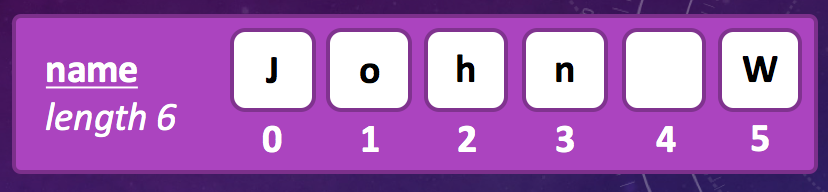
Strings are fundamentally important when programming an application. Not only are messages and values stored as strings, but strings are often used to contain lots of more detailed information that’s sent over the internet. For instance, HTML, CSS and JavaScript is sent over the internet and your browser reads them in as a string before working their magic to turn it into a page you can interact with.
Strings can be as short as one or two words or as long as a whole book. You can fit the first book of the Lord of the Rings into about 1MB of memory and JavaScript would happily handle that as a single string (although, searching through it might take some time)!.
Whenever you create or set a string, you should always surround the text with “quotes”. If you don’t use quotes, JavaScript expects a variable instead.
var firstName = "John";
var lastName = Wordsworth // <-- ERROR! This will look for a variable 'Wordsworth' not a string
String Properties / Functions
Some variables (like strings) have properties and functions inside of them. You can access the properties on strings using a single dot “.” followed by the property name. One of the most useful properties on strings is the length property. The length property tells you how many characters are in the string.
You can use the dot operator on raw strings or variables containing strings.
var name = "Masterchief";
console.log( name.length );			// Prints 11

console.log( "Cortana".length );	// Prints 7
There are a lot of functions built into strings which allow you to do operations on the text. Whether you want to know if a string contains a certain word, starts with a certain letter or just how long it is - you can do these things by calling methods (functions) that the string provides. The following code block shows some examples;
var name = "Alistair";

// Check if the string includes/contains another string
console.log( name.includes("stair") );   	// True

// Check if the string starts with another string
console.log( name.startsWith("Ali") ); 		// True

// Check if the string ends with another string
console.log( name.endsWith("John") );   	// False

// Convert the string to uppercase
console.log( name.toUpperCase() );     		// ALISTAIR
Character Access
Strings are just a list of characters and you can access those characters one at a time if need to search to see if it contains a specific letter. If the user has entered an email address - you might want to search it for an “@” symbol for instance. It is possible to get / read letters from a string one at a time using the charAt(i); method.

Note. Notice that the first letter is given position/index ‘0’ and all subsequent letters step up from there.
Some more examples of interacting with Strings are shown below;
var firstName = "John";
var surname = "Wordsworth";
var fullName = firstName + " " + surname;

console.log(fullName);                  // Prints "John Wordsworth"
console.log(fullName.charAt(0));        // Prints "J"
console.log(fullName.charAt(9));        // Prints "s"

var newName = fullName.replace("John", "Ben");
console.log(newName); // Prints "Ben Wordsworth"
String Reference
There are many useful functions that strings provide for working with them. Some of the most useful are shown below. For the full list, you should visit the Mozilla Developer Network - String Reference.
| Method / Property | Description |
|---|---|
| string.length | Returns the number of characters in the string |
| string.charAt(i) | Returns the character at position ‘i’. |
| string.includes(val) | Returns true if the string contains ‘val’ |
| string.startsWith(val) | Returns true if the string starts with ‘val’ |
| string.endsWith(val) | Returns true if the string ends with ‘val’ |
| string.indexOf(val) | Returns the position of ‘val’ if it exists in the string |
| string.replace(a,b) | Returns a new string with all occurances of ‘a’ replaced by ‘b’ |
| string.substr(a,b) | Returns a substring starting with the letter at position ‘a’ and containing ‘b’ letters. |
| string.toLowerCase() | Returns a string where all UPPERCASE characters have been replaced with lowercase characters. |
| string.toUpperCase() | Returns a string where all lowercase characters have been replaced with UPPERCASE characters. |